Thursday, June 11, 2020

More about Lists.....


The list starts with an open square bracket and ends with a closed square bracket.

The elements inside a list may have different types. Some of them may be integers, others floats and yet others may be lists.

Python has adopted a convention stating that the elements in a list are always numbered starting from zero. This means that the item stored at the beginning of the list will have the number zero.


Indexing Lists

The value inside the brackets which selects one element of the list is called an index, while the operation of selecting an element from the list is known as indexing.


And now we want the value of the fifth element to be copied to the second element.


Accessing list content


The len( ) function


Removing elements from a list
Here we used the keyword “del”. It’s an instruction, not a function.


We can't access an element which doesn't exist - we can neither get its value nor assign it a value. Both of these instructions will cause runtime errors now.


Negative Indices are legal
In lists, negative indices are also legal. See the below example.


Next Example,


Output is


Monday, June 8, 2020

Binary Left Shift & Binary Right Shift


Shifting is applied only to integer values and mustn’t use float values.

Shifting a value one bit to the left thus corresponds to multiplying it by two. Shifting one bit to the right is like dividing by two.

Shift operators in Python are a pair of diagraphs << and >>


The left argument of these operators is an integer value whose bits are shifted. The right argument determines the size of the shift.


Given below the updated priority table.


Given below some of the examples.


Bitwise Operators


This is the “xor” (exclusive or) operator and is denoted as ^ (caret). Given below all the bitwise operators.

& (ampersand) – bitwise conjunction

| (bar) – bitwise disjunction

~ (tilde) – bitwise negation

^ (caret) – bitwise exclusive (xor)


Given below the truth table.


The arguments of these operators must be integers. We must not use floats here.


The logical operators don’t penetrate into the bit level of its argument. They’re only interested in the final integer value.


These operators can be used in abbreviated form.


Wednesday, June 3, 2020

Logical Operators


and operator


It’s a binary operator with a priority that is lower than the one expressed by the comparison operators. It allows us to code complex conditions without the use of parentheses like this one.


Counter > 0 and value == 100


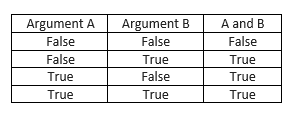
The truth table is given below.


or operator


This is a disjunction operator. It’s a binary operator with a lower priority than “and”.

The truth table is given below.


not operator


This is a unary operator performing a logical negation. It turns truth into falsehood and falsehood into truth.


Logical Expressions


See the below code lines & outputs.


In Python,

not (p and q) == (not p) or (not q)
not (p or q) == (not p) and (not q)

Break & Continue Statements

break - exits the loop immediately, and unconditionally ends the loop's operation, the program begins to execute the nearest instruction after the loop's body.

continue - behaves as if the program has suddenly reached the end of the body, the next turn is started and the condition expression is tested immediately.


Example 1 –


Output is


Example 2 –


Output is


Example 3 –


Output is


Example 4 –


Output is


Example 5 –


Output is


The loop's "else" branch is always executed once, regardless of whether the loop has entered its body or not

If the control variable doesn't exist before the loop starts, it won't exist when the execution reaches the "else" branch.

Tuesday, June 2, 2020

Iterations – For Loop


In “for” loop, there’s no condition after it. So we don’t think about conditions. Because they’re checked internally without any intervention.

Variable after the “for” keyword is the control variable of the loop. It counts the loop’s turns & does it automatically.

The “in” keyword explains a syntax element describing the range of possible values being assigned to the control variable.

The “range ()” function use for generating all the desired values of the control variable. In this case, the range () function starts its job from 0 & finishes it one step before the value of its argument.

Let’s consider about the below program.


Output is


The “range ()” function invocation may be equipped with two arguments & not just one. Given below an example.


Output is


 The range () function accepts only integers as its arguments & generates sequences of integers.

The third argument is an increment - it's a value added to control the variable at every loop turn. Consider the below program.


Output is


If the set generated by the range () function is empty, the loop won't execute its body at all. See below example.


There is no output.


The set generated by the range () has to be sorted in ascending order. There's no way to force the range () to create a set in a different form. This means that the range ()’s second argument must be greater than the first.

Consider the below example also.


Again there’s no output.


Look at the below program.


Output is


Given below the final example with “time” module.


Output is