Saturday, July 4, 2020

Mixing Positional & Keyword Arguments


We can mix both fashions if we want - there is only one unbreakable rule: we have to put positional arguments before keyword arguments.

Let’s consider below snippet.


We can get the output as


This is a pure example of positional argument passing. Also we can replace these arguments like below way.


So the output will be


Let’s try to mix both styles now.


Output will be


Let's analyze it:
  • The argument (3) for the “a” parameter is passed using the positional way.
  • The arguments for c” and “b” are specified as keyword ones.

But if we try to pass more than one value to one argument, all we'll get is a runtime error. Look at the snippet below.


This will get the following error.


Look at the snippet below. This code is fully correct, but it doesn’t make much sense.


Output is


Everything is correct. But leaving in just one keyword argument looks a bit weird.

Thursday, July 2, 2020

Keyword Argument Passing


Here the meaning of the argument is dictated by its name, not by its position.

Look at the below snippet.


Output is


The concept is clear - the values passed to the parameters are preceded by the target parameters' names, followed by the “=” sign.

The position doesn't matter here - each argument's value knows its destination on the basis of the name used.

Positional Parameter Passing


A technique which assigns the ith (first, second, and so on) argument to the ith (first, second, and so on) function parameter is called positional parameter passing, while arguments passed in this way are named positional arguments.

Let’s consider the below snippet.


Output is


Positional parameter passing is intuitively used by people in many social occasions. For example, it may be generally accepted that when we introduce ourselves we mention our first name(s) before our last name, e.g., "My name's John Doe".

Let's implement that social custom in Python.


Output is


Parameterized Functions


A parameter is actually a variable, but there are two important factors that make parameters different & special.

Parameters exist only inside functions in which they have been defined, and the only place where the parameter can be defined is a space between a pair of parentheses in the “def” statement.

Assigning a value to the parameter is done at the time of the function’s invocation, by specifying the corresponding argument.

We should remember this carefully. Specifying one or more parameters in a function’s definition is also a requirement, and we have to fulfill it during invocation. We must provide as many arguments as there are defined parameters.

Failure to do so will cause an error.

Let’s consider this example.


This code will produce the following output.


The value of the argument used during invocation (1) has been passed into the function, setting the initial value of the parameter named “number”.

Also it’s legal and possible to have a variable named the same as a function’s parameter. Let’s see the below snippet.


Output is


A situation like this activates a mechanism called shadowing.

Parameter “x” shadows any variable of the same name, but... only inside the function defining the parameter.

The parameter named “number” is a completely different entity from the variable named “number”.

A function can have as many parameters as we want, but the more parameters we have, the harder it is to memorize their roles and purposes.

Let's modify the function - it has two parameters now.


Output is


Functions


In Python, functions come from at least three ways.

1.      From preinstalled modules in Python.
2.      From built-in functions in Python.
3.      From directly in code.

Given below the format of a function.

def functionName():
     functionBody


·         It always starts with the keyword “def” (for define)
·         Next after “def” goes the name of the function (the rules for naming functions are exactly the same as for naming variables)
·         After the function name, there's a place for a pair of parentheses (they contain nothing here, but that will change soon)
·         The line has to be ended with a colon ( ; )
·         The line directly after “def” begins the function body - a couple (at least one) of necessarily nested instructions, which will be executed every time the function is invoked; note: the function ends where the nesting ends, so we have to be careful.


Consider the below example.


Output is


When the moment of the invocation of the function, there are two important factors to consider.

Firstly,

You mustn’t invoke a function which is not known at the moment of invocation.

Python reads your code from top to bottom. It’s not going to look ahead in order to find a function we forgot to put in the right place (right means “before invocation”).

Consider the below example.


Here we get the error message like this.


Secondly,

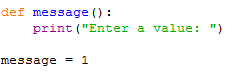
You mustn’t have a function and a variable of the same name.

Consider the below example. This is the erroneous snippet.


Assigning a value to the name message causes Python to forget its previous role. The function named “message” becomes unavailable.

We’re free to mix the code with functions. But we’re not obliged to put all the functions at the top of the source file.

Look at the snippet below.


This is also completely correct and works as intended.

“in” and “not in” Operators


These two operators able to look through the list in order to check whether a specific value is stored inside the list or not.

Consider the below snippet.


Output is


Simple Programs by using Lists


Output is 17.

If we try the above program in below way.


So, here we have a question which of these two actions consumes more computer resources - just one comparison, or slicing almost all of a list's elements?


Let’s consider the below snippet.


Let’s find the location of a given element inside a list.


Output is


If we want to find how many same numbers in a given two sets of numbers, let’s consider the below snippets.


Output is 4.

This task is to write a program which removes all the number repetitions from the list. The goal is to have a list in which all the numbers appear not more than once.


Output is


Lists in Lists


Wednesday, July 1, 2020

Slices with Negative Indices


Consider the below programs.


Output is


If the “start” specifies an element lying further than the one described by the "end" (from the list's beginning point of view), the slice will be empty.


Output is


If we omit the “start” in the slice, it is assumed that we want to get a slice beginning at the element with index “0”.


The slice of this form:


myList [ : end]
is equivalent to myList [ 0 : end]


Look at the code below.


Output is


If we omit the “end” in our slice, it is assumed that we want the slice to end at the element with the index “len (myList)”.

The slice of this form is myList [start : ] equivalent to myList [start : len (myList) ]

Consider the following snippet.


Output is


By omitting both “start” and “end” makes a copy of the whole list.


Output is


“del” instruction is able to delete more than just a list’s element at once, it can delete slices too.


In this case, the slice doesn’t produce any new list. So the output is


Deleting all the elements at once is possible.


Output is


Here the “del” instruction will delete the list itself, not its content.


The “print ( )” function invocation from the last line of the code will then cause a runtime error.